1. What a compartment model is
A neuron's membrane separates two salty solutions. It holds charge like a capacitor, and it leaks a little current like a resistor. Inside, the neurites conduct current along their length, but not very well, so a voltage change at one end of a long thin branch is much smaller by the time it reaches the other end.
A compartment model captures exactly this. The neuron is cut into short pieces, the compartments. Each one is a small patch of membrane, and neighbouring compartments are connected by the resistance of the cytoplasm between them. Current injected anywhere — by a synapse, by an electrode — spreads through this network, and the model tells you the voltage everywhere over time.
1.1 Passive properties
A membrane with nothing but a capacitance and a leak is passive: it adds up its inputs and lets them fade, but never spikes. Four numbers describe it:
| Name | Unit | What it is |
|---|---|---|
| Rm | Ω·cm² | how well the membrane insulates: higher means less current leaks out |
| Cm | µF/cm² | how much charge the membrane stores: higher means it charges more slowly |
| Ra | Ω·cm | how poorly the cytoplasm conducts: higher means signals fade faster along a neurite |
| E leak | mV | the voltage the cell settles at when nothing drives it, its resting potential |
None of these can be read off a reconstruction. They come from recordings — either published values from a similar neuron, or values fitted to a recording of your own, which is what section 4 is about.
The other thing that matters is the shape of the neuron, above all the radius of each neurite. A neurite half as thick has four times the axial resistance, so a model is only as good as the radii in its skeleton. How far a voltage reaches is measured by the length constant λ: the distance over which a steady voltage falls to about a third.
1.2 Active properties (channels)
Spikes come from voltage-gated channels: pores in the membrane that open when the voltage rises. Sodium channels open first and let positive charge in, which raises the voltage further; potassium channels open a little later and bring it back down. Where there are enough of them, a small depolarisation turns into a spike.
You place channels on regions of the neuron — the axon, the soma, or any stretch you mark out — each at a density, in mS/cm². In most insect neurons the soma sits off to the side on a thin neurite and takes no part in spiking. Spikes start in the axon, close to where it leaves the dendrites, and the soma only sees them as small ripples. So the model in section 3 puts its channels on the axon, with a much higher density on the stretch where the axon starts.
2. The nodes
The Biophysics plugin adds five nodes. Everything else in the workflows below is a node Coda already has.
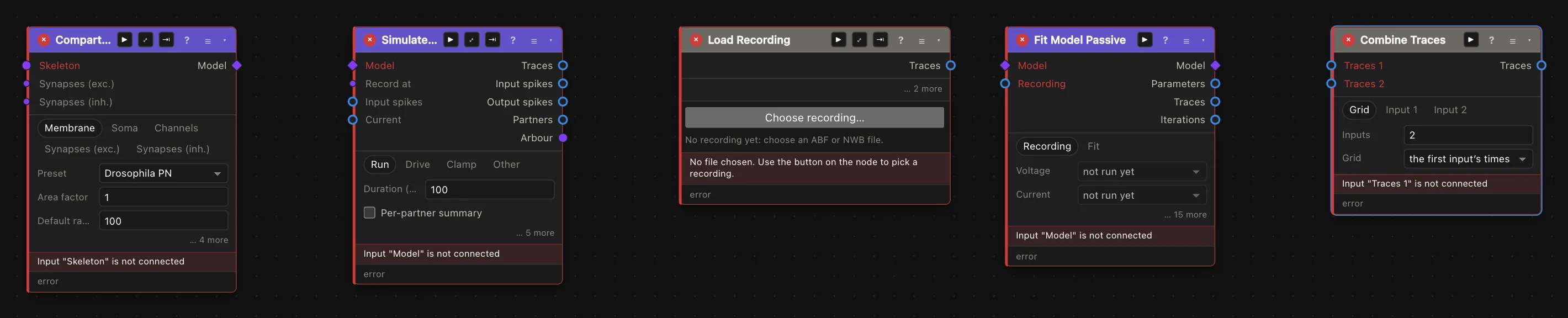
From the left: Compartment Model builds a model from one neuron's skeleton, and Simulate Model runs it. Load Recording reads a patch-clamp recording (ABF or NWB), Fit Model Passive fits a model's membrane to one, and Combine Traces puts a recording and a simulation on one time axis. Each card's ? opens its own help.
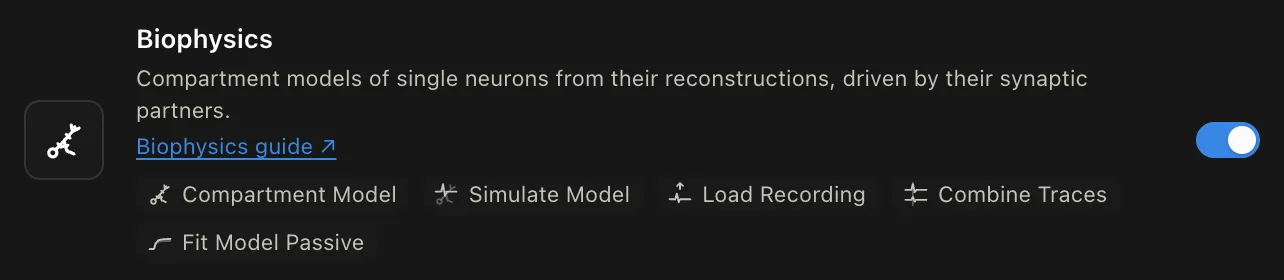
The plugin is off until you switch it on: open Plugins in the toolbar and switch on Biophysics, or type /biophys in the command palette. Simulate Model and Fit Model Passive only run when you press Run, since a simulation can take a while. Both run in the background, so you can keep working.
3. Step by step: a neuron driven by its inputs
This section builds one model from start to finish: a projection neuron of the DA1 glomerulus, given sodium and potassium channels on its axon and driven by the olfactory receptor neurons (ORNs) that synapse onto it. Each step shows what your canvas should look like. The finished workflow is also an example you can open. It reads from neuPrint, so it needs a neuPrint sign-in, under Connections.
Step 1: Switch on the plugin
The Biophysics plugin is off until you switch it on. Open Plugins in the toolbar and switch on Biophysics, or type /biophys in the command palette. Its five nodes then appear in the node menus.
Step 2: Pull a neuron
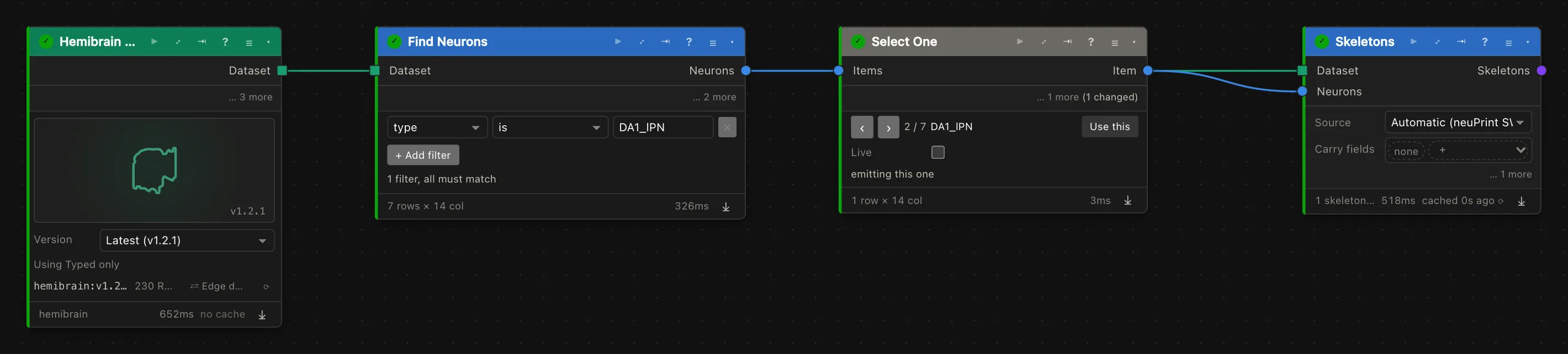
A compartment model is one neuron, so the first cards pick one and fetch its skeleton:
- Add a Hemibrain dataset card.
- Add Find Neurons, wire the dataset into it, and add a filter:
typeisDA1_lPN. It finds the seven DA1 projection neurons. - Add Select One after it. It passes on one neuron at a time; step its arrows to the second of the seven (hemibrain
754534424) and press Use this. - Add Skeletons, and wire the dataset and Select One's item into it.
Step 3: Build the model
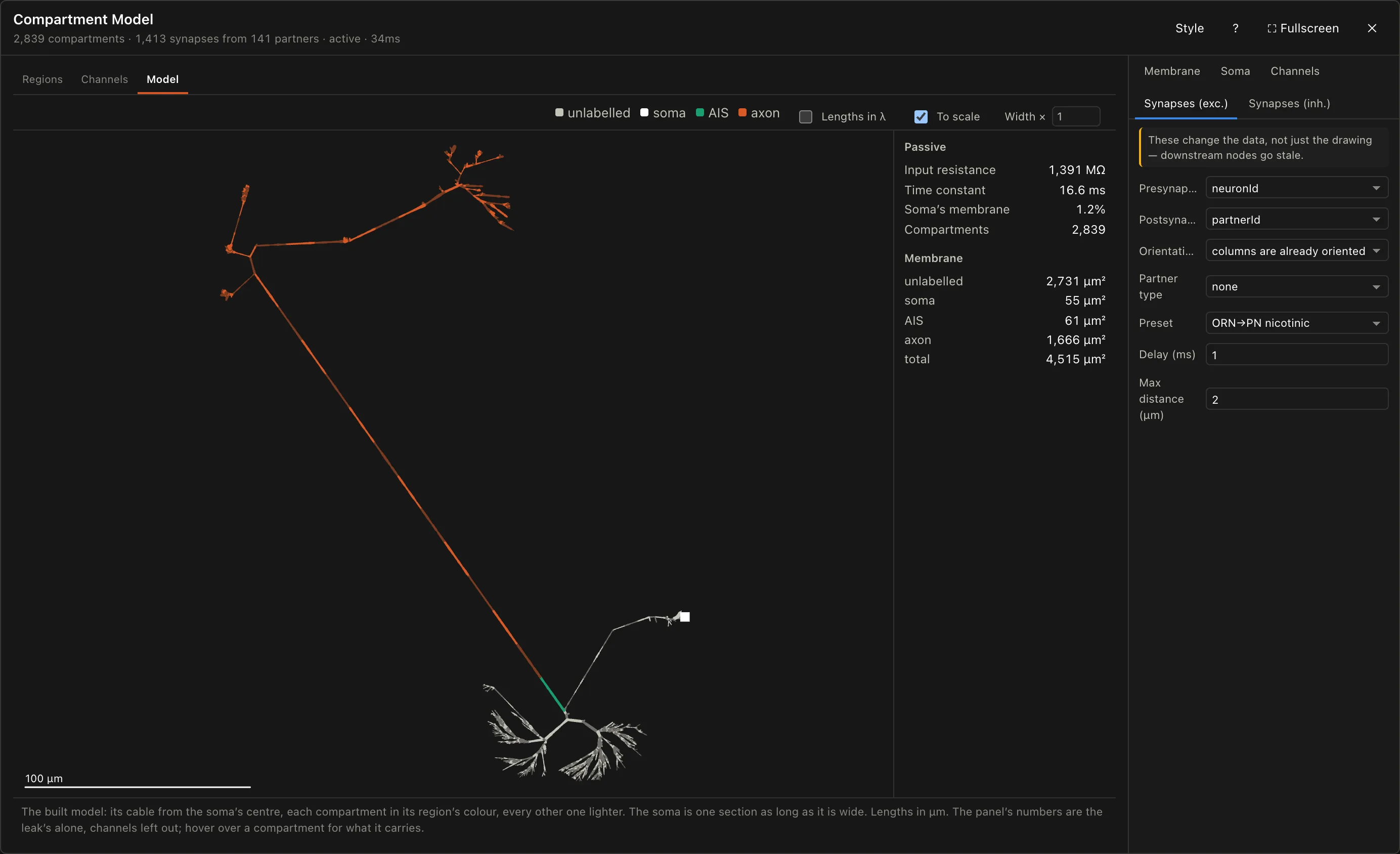
Add a Compartment Model and wire the skeleton into its Skeleton input. The card builds the model at once and says how many compartments it has. Then expand it (⤢) to set it up.
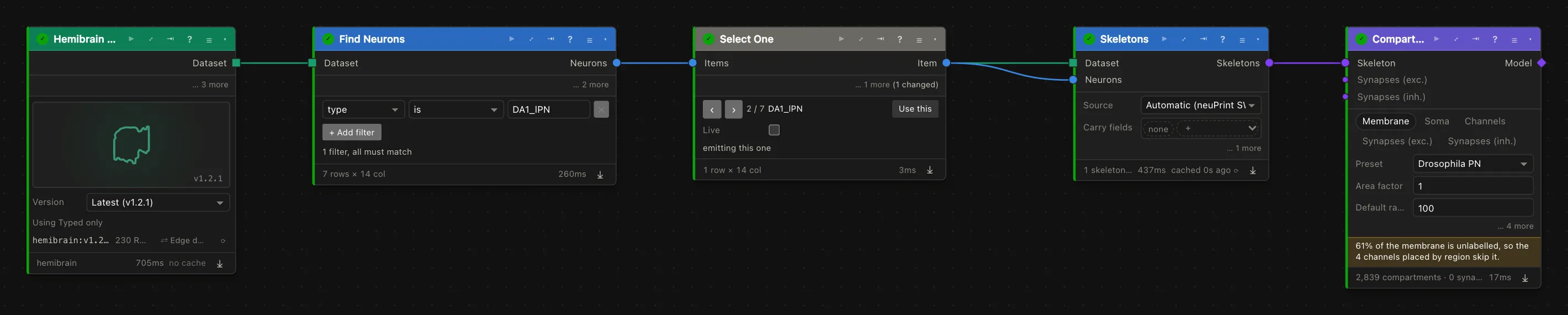
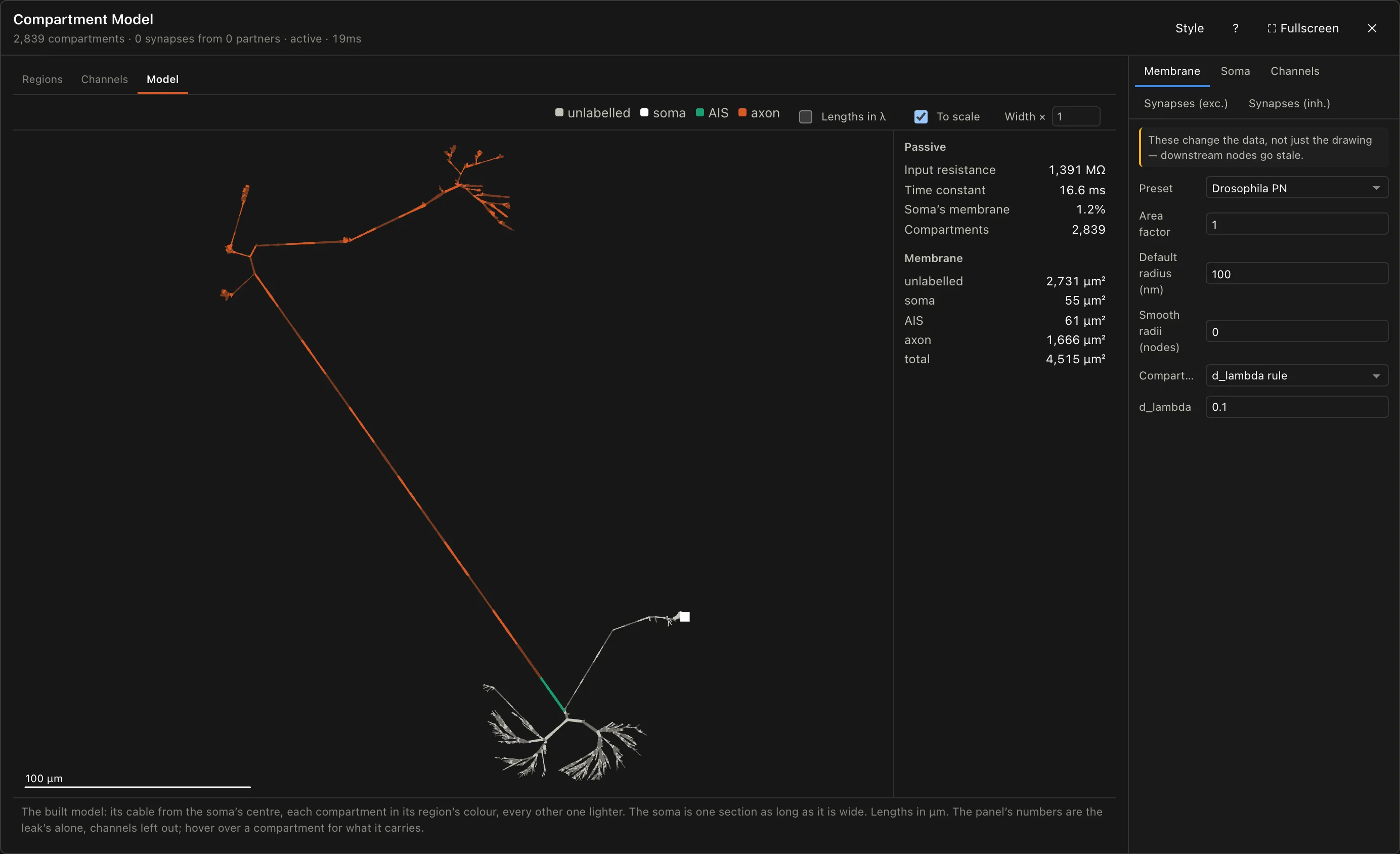
Passive properties. The settings beside the drawing start on Membrane. Preset picks published passive constants; "Drosophila PN" (Tobin et al. 2017), fitted to antennal-lobe projection neurons like this one, is the default, so leave it. The Model tab draws the cable the solver will run on, with a few numbers that catch a broken model: the input resistance at the soma, the membrane time constant, the soma's share of the membrane, and each region's membrane area. Hover over any compartment to see what it carries.
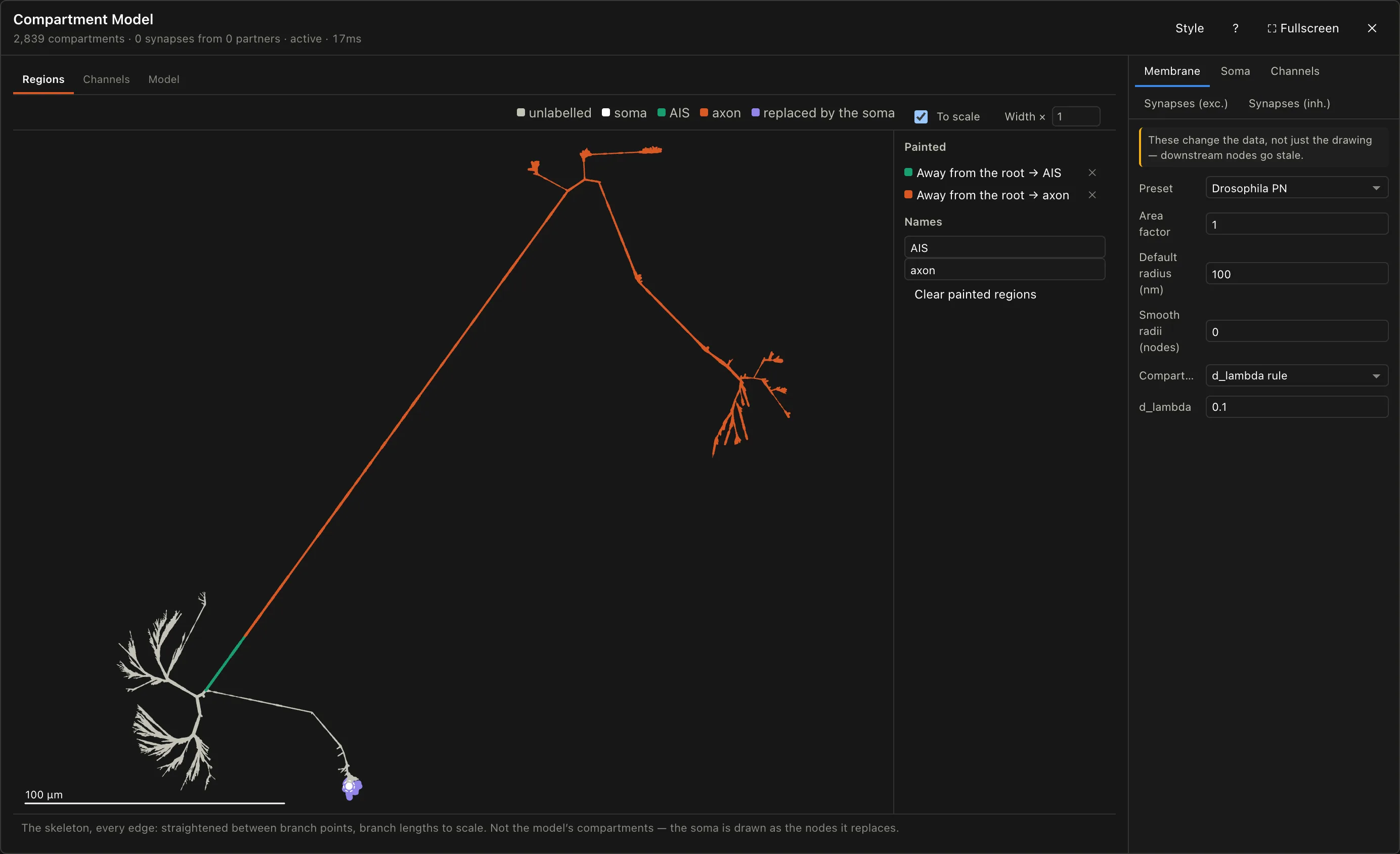
Regions. Channels go on regions, so the axon has to be marked out first. This neuron's skeleton labels only its soma, so open the Regions tab and paint the rest. It draws the neuron as a dendrogram: click a branch and choose what to paint, everything away from the root (the soma) from that point on, or everything else, as an existing region or a new one. Strokes are applied in order, and a later one paints over an earlier one.
The primary neurite runs from the soma into the antennal lobe and splits, 75 µm out, into the dendrite and the axon. Paint two strokes:
- On the axon, just past that branch point: away from the root, as a new region. Rename it
AISin the list beside the dendrogram. - 25 µm further along the axon: away from the root, as
axon.
The second stroke paints most of the first one back, leaving a 25 µm AIS where the axon begins, and axon beyond it. The dendrite stays unlabelled, and the card says so: 61% of the membrane carries no channels, which is what this model intends.
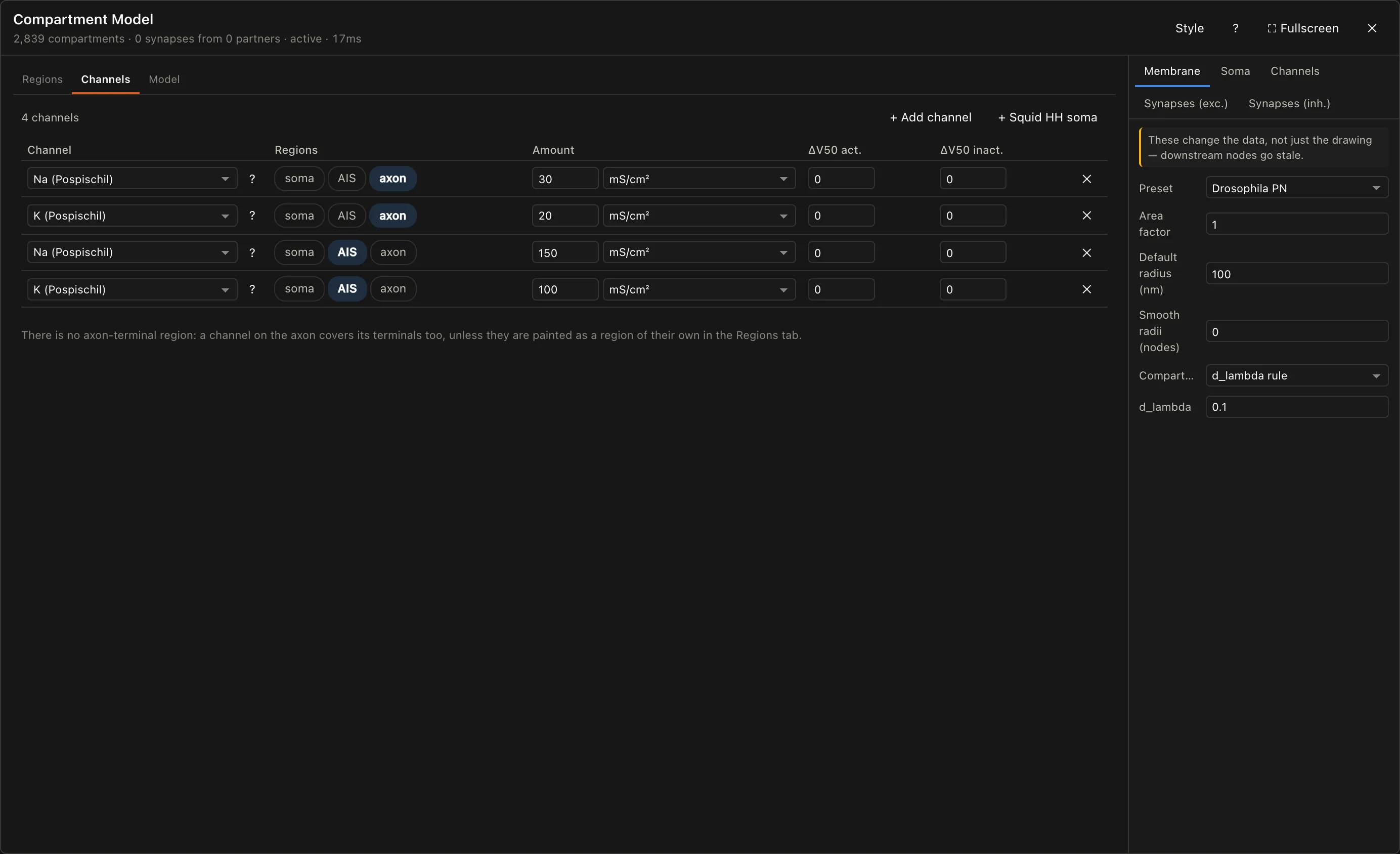
Channels. Open the Channels tab and add four rows. Each row is one channel, the regions it sits on, and how much of it:
| Channel | Regions | Density (mS/cm²) |
|---|---|---|
| Na (Pospischil) | axon | 30 |
| K (Pospischil) | axon | 20 |
| Na (Pospischil) | AIS | 150 |
| K (Pospischil) | AIS | 100 |
The axon can carry a spike along its length, and the five-times denser AIS is where one starts. Each row's ? says what its channel is. The fly set (NaT, NaP, Ks, Kf, from Günay et al. 2015) is in the same list; a new row of it starts as their model's axon, on the axon at their axon's densities.
Step 4: Add its input
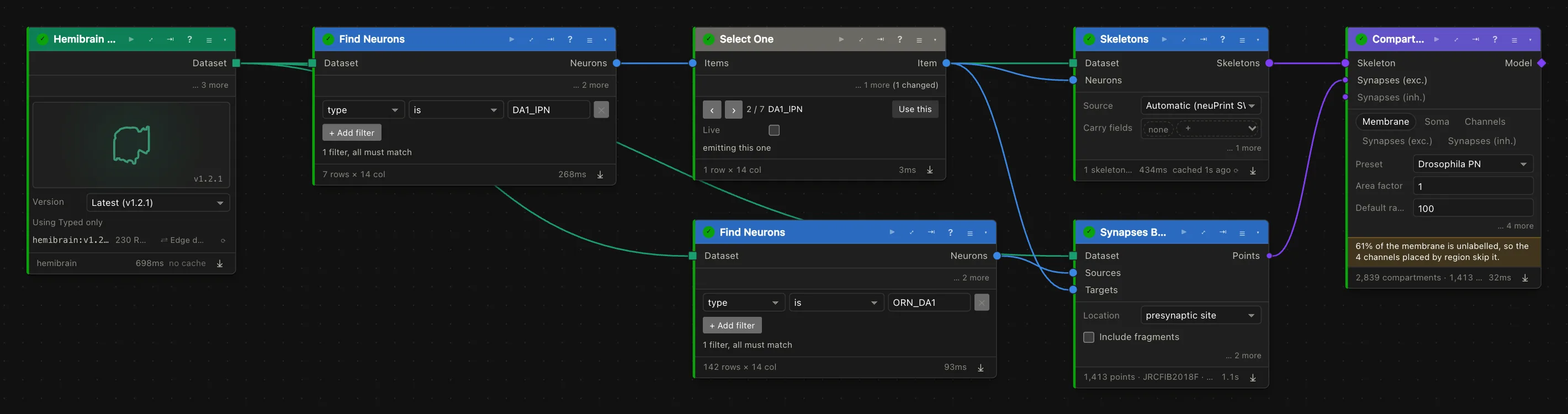
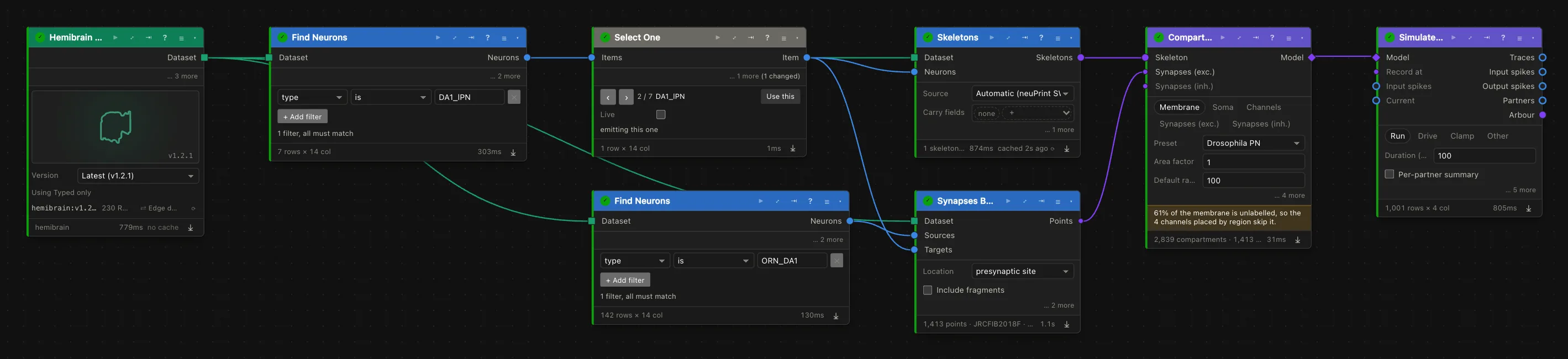
The model so far has no synapses. Fetch the ones its ORNs make onto it:
- Add a second Find Neurons on the same dataset, filtered to
typeisORN_DA1. It finds 142 of them. - Add Synapses Between. Wire the dataset into it, the ORNs into
Sources, and Select One's item (the projection neuron) intoTargets. - Wire its points into the Compartment Model's
Synapses (exc.)input.
Each synapse is placed on the arbour where it sits, and all synapses from one partner fire together. The card counts them: 1,413 synapses from 141 ORNs.
Then tell the model what kind of synapse these are. Expand the Compartment Model again, open Synapses (exc.) among its settings, and choose the ORN→PN nicotinic preset: the rise, decay, reversal and conductance measured for exactly this connection.
Step 5: Set up the simulation
Add Simulate Model and wire the model into it.
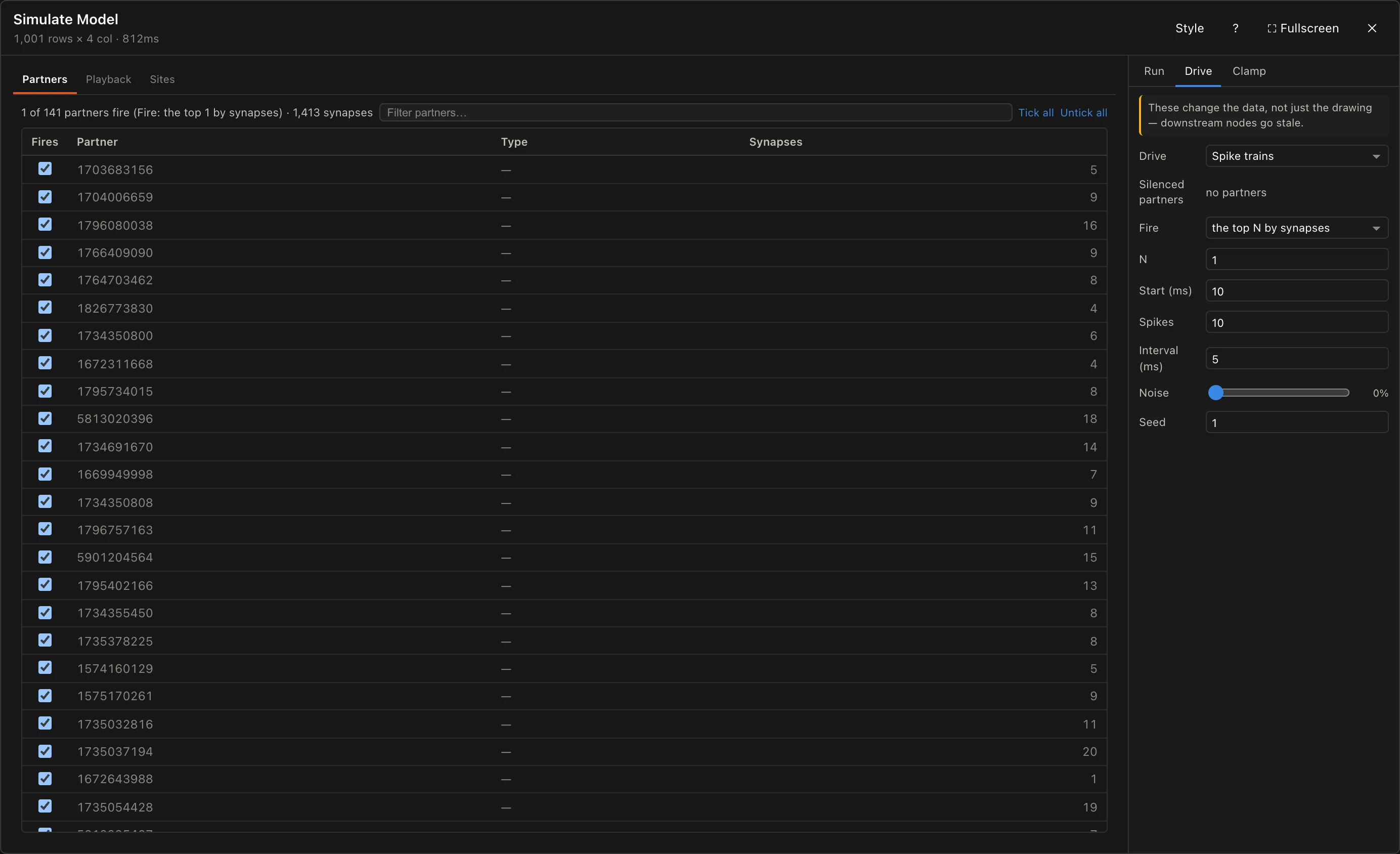
Who fires, and how. Expand Simulate Model. The Partners tab lists every ORN with its synapse count. By default every partner fires at once, which on a real neuron drives the cell to the synapses' reversal and sits it there. Fire one strong ORN instead: set Fire under Drive to "the top N by synapses" with N at 1, which picks the strongest (25 synapses); or untick every partner but the one you want. Then set its spike train under Drive: Spikes spikes from Start, Interval apart. Here, 10 spikes from 10 ms, 5 ms apart.
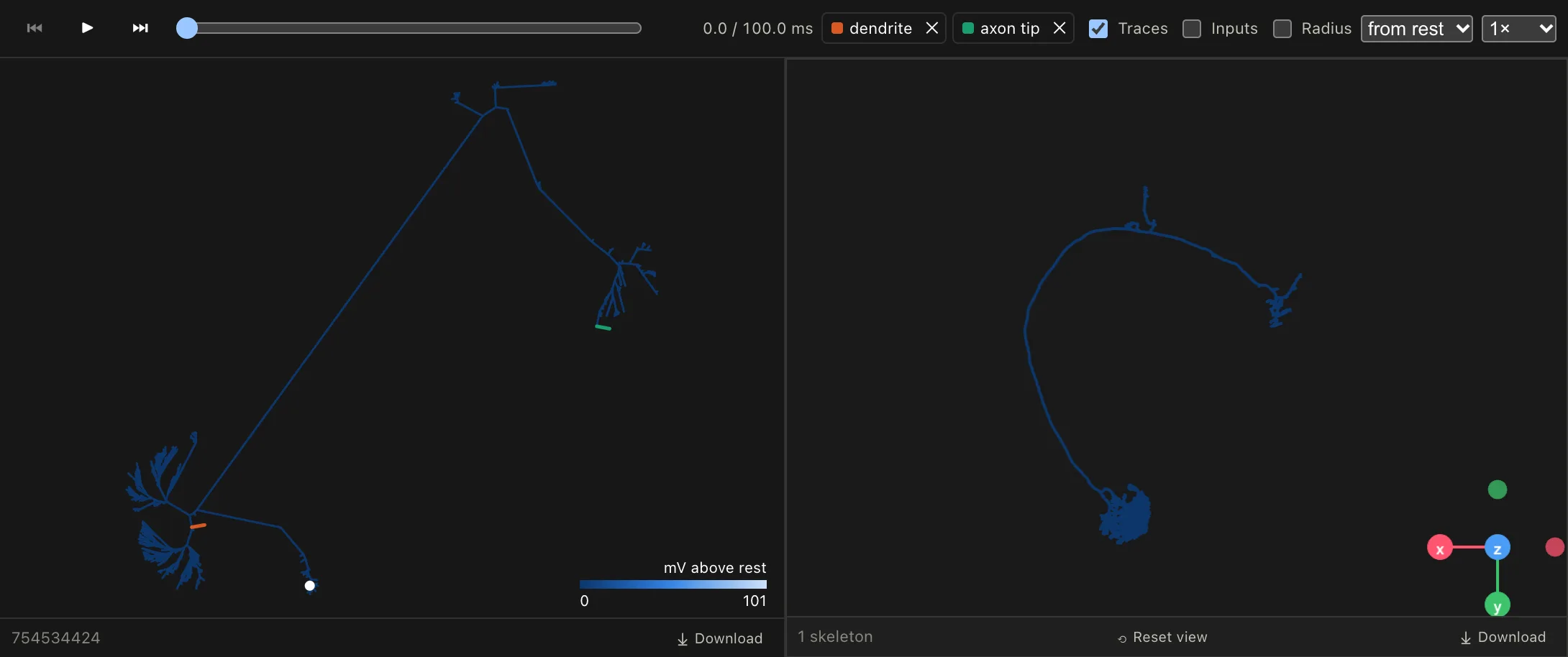
Where to record. The soma is always recorded. Open Playback and click a branch on the dendrogram to record there too; each added trace is marked on the dendrogram in its colour, and becomes a column of the Traces output after the next run. Add one at the base of the dendrite, just past the branch point, and one at the far tip of the axon in the lateral horn.
To record at many sites at once, wire points into Record at instead: the neuron's own output synapses, say, or points placed by hand in Skeleton to Points.
Current instead of synapses. To inject current, as an electrode would, tick Inject current under Clamp and pick a step, ramp, sine or pulse train; the Sites tab says where it goes in. Or wire a table into the Current input, such as a recorded command from Load Recording. Set Drive to "None" to inject current alone.
Step 6: Run it
Press Run. The card estimates the run time beforehand; this one takes under a second. Then open Playback to watch the run spread over the neuron: the dendrogram and the 3D view coloured by voltage, the traces below. Play it, step with the arrow keys or drag the time slider.
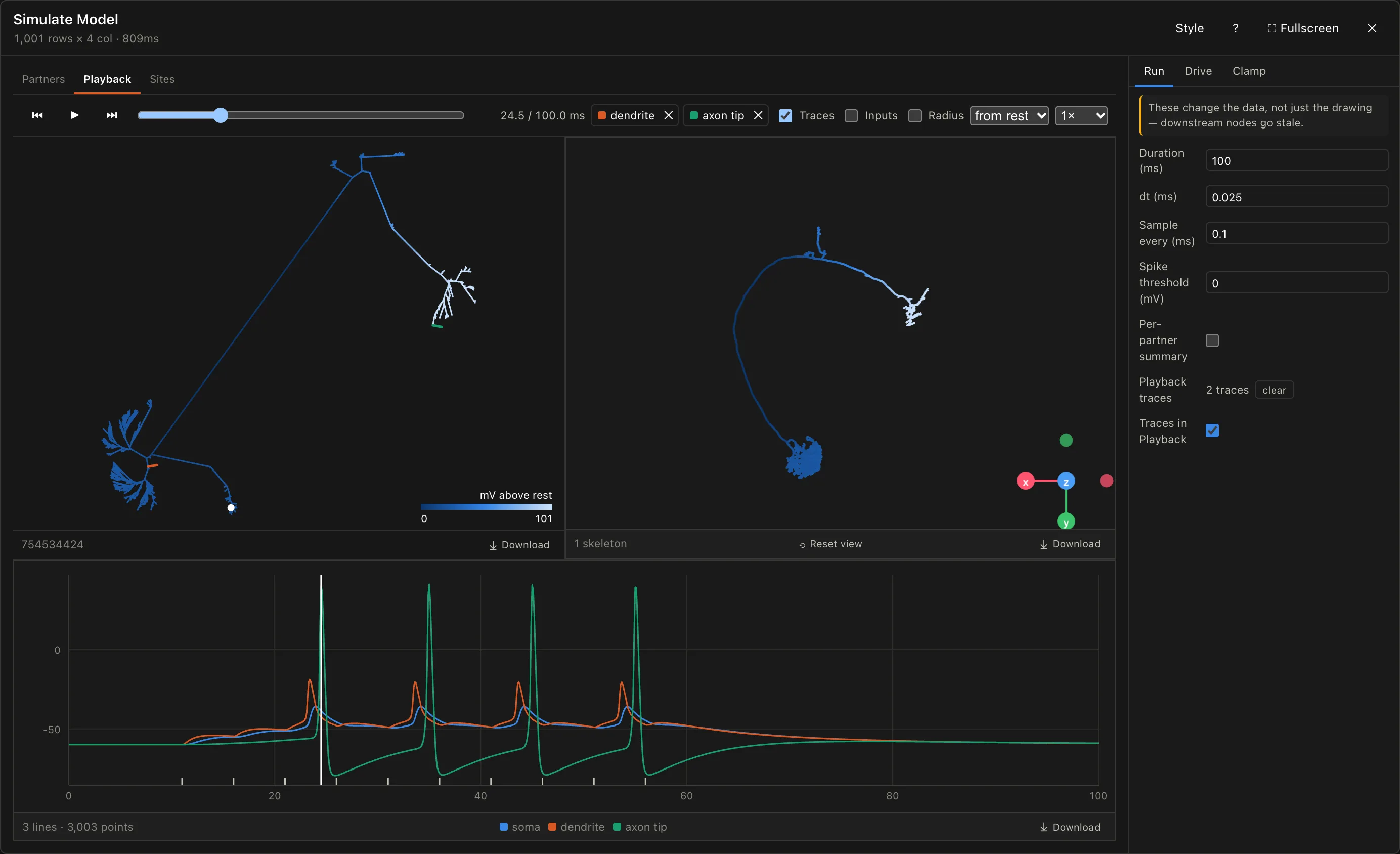
The ORN's train depolarises the dendrite, and once it is deep enough the AIS fires. The spike runs out to the axon's tip at full height, four times in all, while at the soma, 75 µm of thin neurite away, each one is only a ripple.
Simulate Model has five outputs:
| Output | What it holds |
|---|---|
Traces | time, and the voltage at every record site, one column each |
Input spikes | every spike each partner fired, and when it arrived at its synapses |
Output spikes | every spike at each record site that crossed Spike threshold (0 mV), and when |
Partners | each partner, whether it fired, and with Per-partner summary ticked, what it did alone |
Arbour | the neuron, each node carrying the highest voltage it reached |
Wire Traces into a Line Chart and Output spikes into a Table:
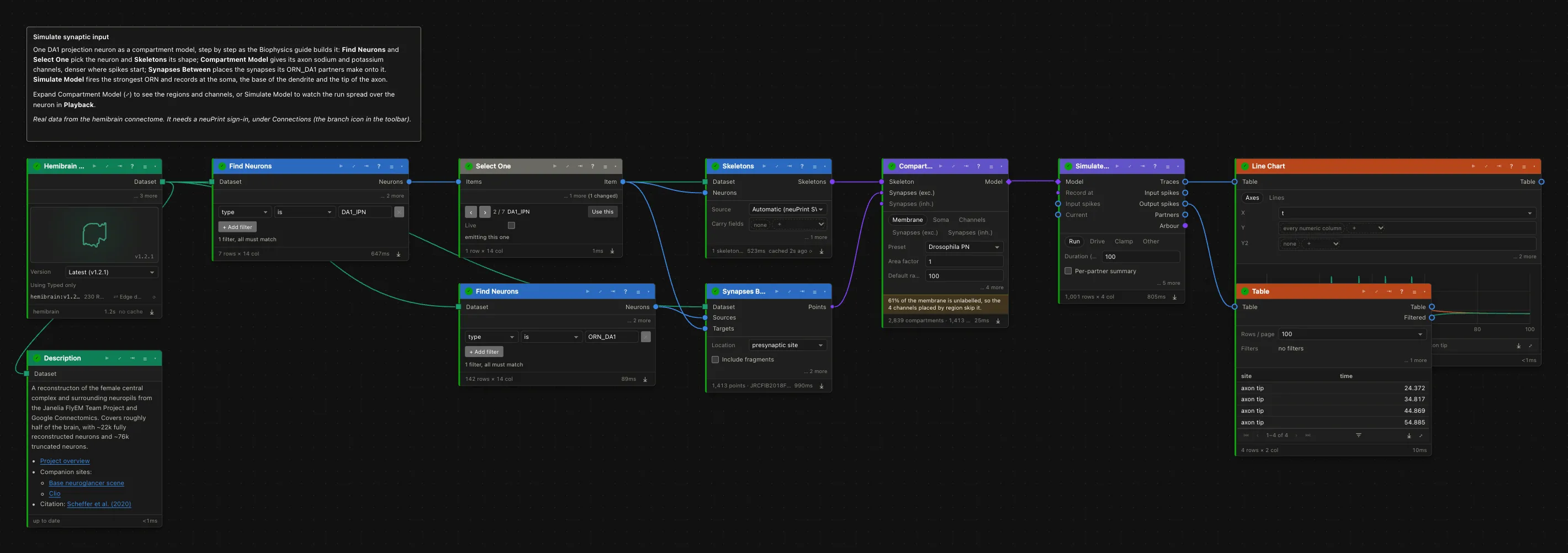
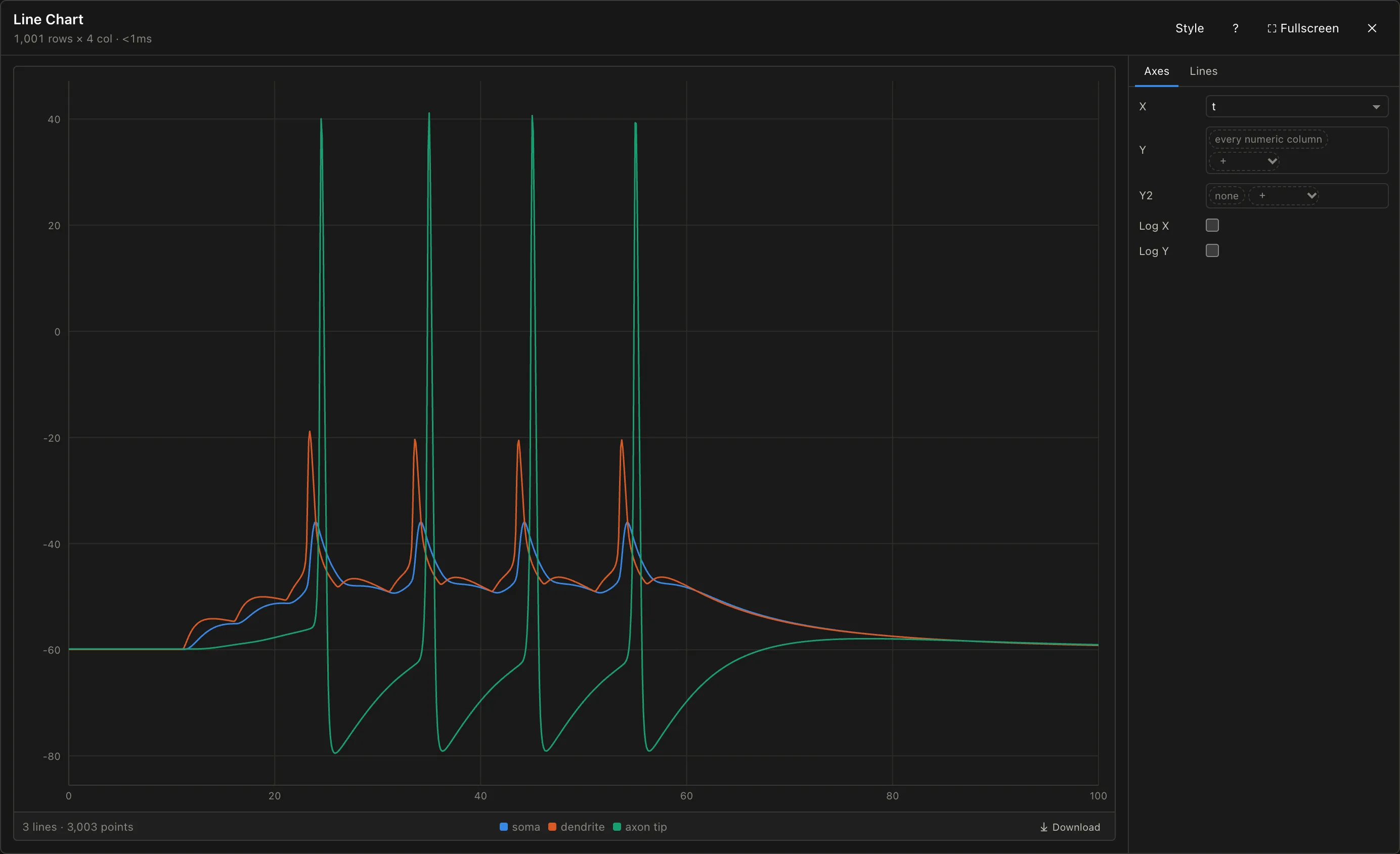
Arbour goes into a 3D View: colour the skeleton "by node value" with "peak voltage (mV)" to see how far each spike reached. And with Per-partner summary ticked, Simulate Model also runs each firing partner on its own, and Partners says how much each moved the voltage at its own synapses and at the soma: how much of its input survives the trip.
4. Fitting the model
Published membrane constants are a starting point. If you have recorded from the neuron type you are modelling, you can fit the passive membrane to that recording instead: load a current-clamp recording, build a model of the same neuron, and let Fit Model Passive adjust Rm, Cm, Ra and E leak until the model's voltage matches the recorded one.
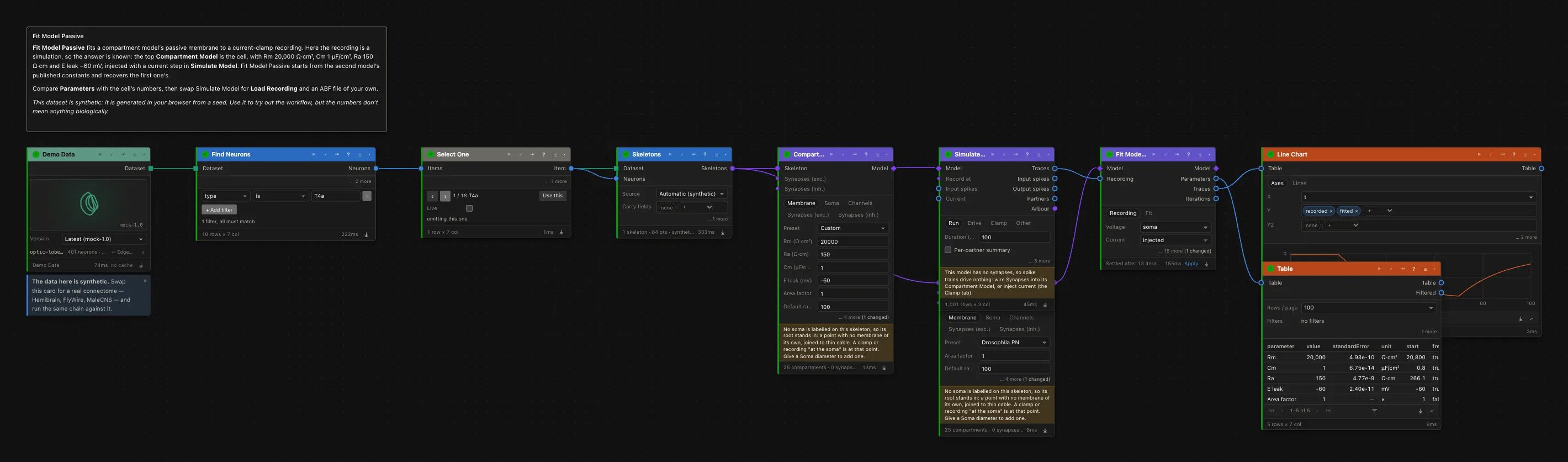
The fitting example opens a workflow with a twist: the "recording" is itself a simulation of a model with known constants, so you can check that the fit finds them. That is worth doing once before trusting a fit to real data.
4.1 Load the recording
Load Recording reads Axon Binary Files (ABF 1 and 2, from Clampex) and Neurodata Without Borders files (NWB 2). Choose the file on the card. The file is read in your browser and never uploaded. It stays in this browser rather than in the workflow, so somebody you share the workflow with has to choose the same file again.
The card says what is in the file: the channels, their units, the sweeps and their length. Choose the sweeps to use under Sweeps. An NWB file often holds several protocols (a seal test, steps, ramps); Protocol picks one.
For a passive fit, use small hyperpolarising current steps: the cell stays well away from any spike, and its channels stay closed.
4.2 A starting model
Build a Compartment Model of the same neuron, as in step 3. Synapses are not needed. The model's membrane is where the fit starts, so a preset is fine.
4.3 Fit
Wire the model into Fit Model Passive's Model input and Load Recording's Traces into Recording, then press Run. The fit replays the current that was injected into the cell in each sweep, compares the model's voltage at the soma with the recorded voltage, and adjusts the membrane until the difference stops shrinking.
The tick boxes choose what is fitted. The usual choice is to leave Cm fixed at 1 µF/cm² and fit the Area factor instead: a reconstruction misses spines and fine branches, so the real cell has more membrane than the skeleton, and the recording can't tell more membrane apart from more capacitance per µm².
The recording electrode adds a leak of its own: current escapes through the seal between electrode and membrane to the bath, at 0 mV. Left out, the fit puts it on the cell, and E leak comes out depolarised. Set Seal (nS) if you know it, or tick Fit Seal. The fitted model leaves the seal behind, since it belongs to the electrode.
4.4 Read the result
After a run, the card's foot says how the fit ended — "Settled after 12 iterations", "Stalled", or "Stopped at" the iteration limit — with the error at the start and at the end. Expand the card to see the recorded and fitted voltage one sweep at a time, the fitted values with their standard errors, and how the error fell.
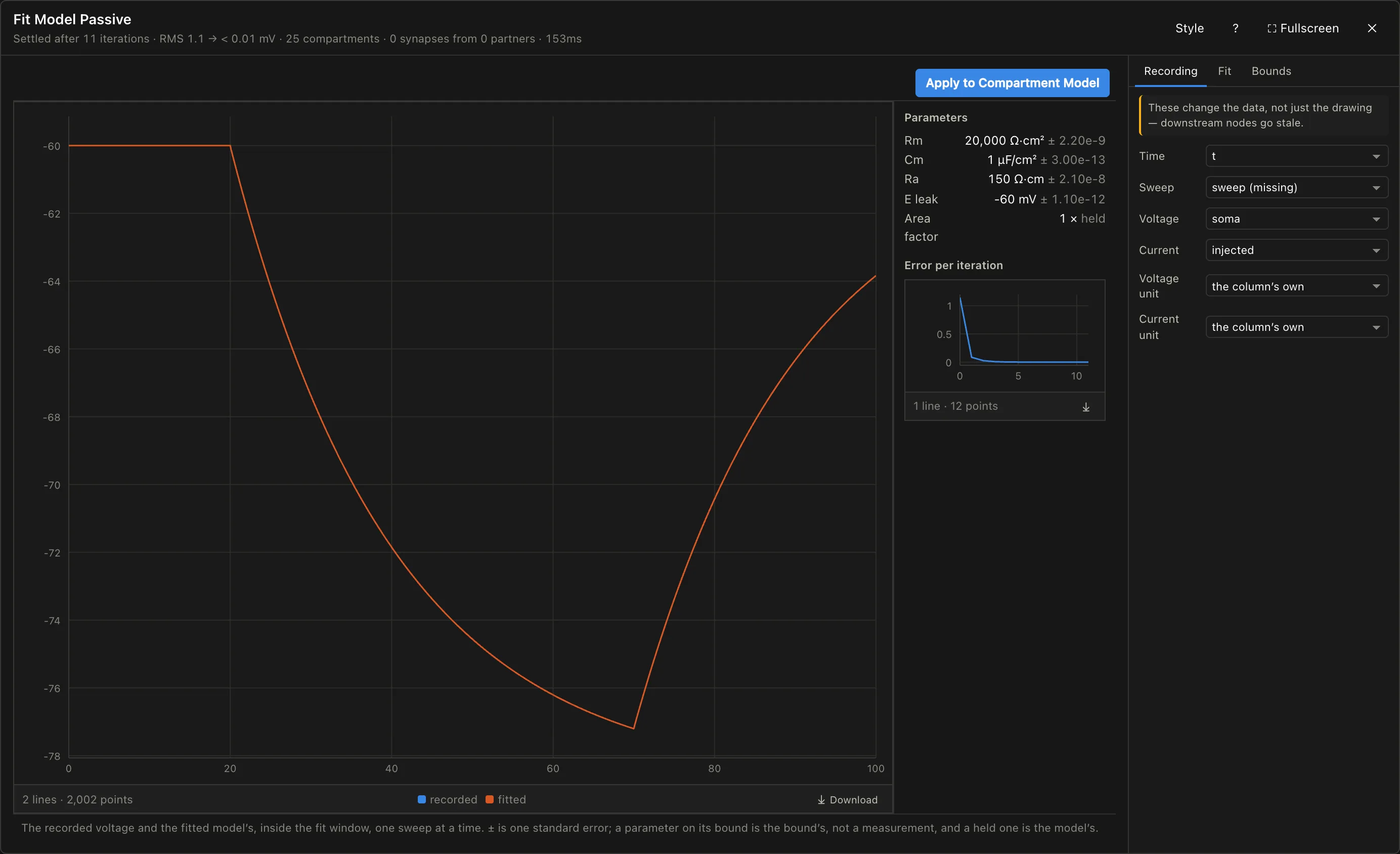
Look at the standard errors before you look at the values. A large standard error means the recording says little about that parameter. A parameter that ended on its bound is not a measurement at all: the data wanted a value outside the allowed range. If Ra or Cm ends on a bound, the reconstruction's geometry probably doesn't match the cell you recorded from.
4.5 Use the fitted model
Fit Model Passive's Model output is the fitted cell, with any channels the starting model had: wire it into a Simulate Model and drive it as in steps 5 and 6. Alternatively, Apply on the card's foot writes the fitted values into the Compartment Model you started from; one undo takes it back.
To plot the recording and a simulation together, put both through Combine Traces, which puts them on one time axis, and wire the result into a Line Chart. Its Shift lines up the stimulus when the recording's step starts at 1000 ms and the simulation's at 10 ms.
Things to watch out for
Most of these give a plausible-looking result when they go wrong.
- Radii. Axial resistance goes with 1/r². A skeleton with missing, noisy or very coarse radii gives a model whose resistance is arbitrary. Check how many nodes got the default radius on the card, and consider
Smooth radii. - The soma. A skeleton that marks no soma gets a point at its root; set a
Soma diameter, in µm. A value meant in nm makes a soma that holds nearly all the membrane, and the card warns about it. - Too many partners at once. Every partner firing drives the cell to the reversal potential. Fire the top few, or silence partners.
- Borrowed channels. Squid HH and Pospischil channels can tell you whether and where a spike is possible, not how a fly neuron fires. The fly set is a larval motoneuron's, not your neuron's. Densities are chosen, not measured, whichever set you use.
- The seal. A fit to a whole-cell recording with the seal left out reports the electrode's leak as the cell's:
E leaktoo depolarised,Rmtoo low. - The reconstruction is not the cell you recorded from. A fit to one animal's recording on another animal's skeleton absorbs every difference in shape into the membrane constants. Parameters ending on bounds are the usual sign.
- Fitting a passive membrane with an active cell. Only small hyperpolarising sweeps keep the channels closed. Large depolarising ones make the fit explain a channel with Rm.
- One neuron, one model. Synapses are inputs; their partners are not modelled. There is no network simulation.
- No notebook export. The notebook and R Markdown exporters refuse these nodes, since no Python or R library reproduces the model as built here. A NEURON script export is planned.
Further reading
- Koch, C. (1999). Biophysics of Computation. Oxford University Press.
- Carnevale, N. T. & Hines, M. L. (2006). The NEURON Book. Cambridge University Press.
- Gouwens, N. W. & Wilson, R. I. (2009). Signal propagation in Drosophila central neurons. J. Neurosci.
- Tobin, W. F., Wilson, R. I. & Lee, W.-C. A. (2017). Wiring variations that enable and constrain neural computation in a sensory microcircuit. eLife.
- Meier, M. & Borst, A. (2019). Extreme compartmentalization in a Drosophila amacrine cell. Curr. Biol.
- Pospischil, M. et al. (2008). Minimal Hodgkin–Huxley type models for different classes of cortical and thalamic neurons. Biol. Cybern.
- Günay, C. et al. (2015). Distal spike initiation zone location estimation by morphological simulation of ionic current filtering demonstrated in a novel model of an identified Drosophila motoneuron. PLoS Comput. Biol.
- Gruntman, E., Romani, S. & Reiser, M. B. (2018). Simple integration of fast excitation and offset, delayed inhibition computes directional selectivity in Drosophila. Nat. Neurosci.